See allowance left for configured Claude, Codex, Cursor and Grok accounts while you work. Click for reading details and available reset times, with warnings for supported Codex banked resets approaching expiry.
Weekly · resets in 3d 4h · 5-hour window: 58% left
Codex · Work84% left
Weekly · resets in 5d 2h
Cursor37% left
Included usage · next reset in 12d
Grok71% left
Weekly · recorded 20 minutes ago
Refresh now ⌘R
Preferences… ⌘,
Open at login ✓
Each colored bar shows the allowance left for an account. Click the app's menu bar icon for percentages and available reset times.
Synthetic numbers; this web preview does not connect to your accounts. Menu appearance varies with macOS.
This Mac App Store edition reads selected local logs, usage file imports, manual readings and supported usage APIs. It does not connect through external CLIs or browser sessions, or send requests to start idle usage windows.
See your available banked resets
Keep banked reset expiry dates in view.
Check the expiry dates of Tibo's banked resets. A warning dot identifies an account with a banked reset approaching expiry. Open the menu for its date and available count before deciding how to use it.
Choose a warning window from 1 to 14 days ahead in Preferences. The dot flags the account; open the menu to see available banked resets and expiry dates. Warnings need a Codex usage file with those dates.
Checking several dashboards can interrupt your work. Keep allowance for eight supported AI tools in the menu bar, then open local history to compare accounts, allowance windows and reset events. Desktop widgets keep cached readings and their age nearby.
The filled part of a bar shows allowance left and gets shorter as you use it. Each account keeps its own color, so you can still recognise it when the balance is low.
01
Keep your account checks nearby
Check percentages, reset times and reading age in the menu bar. Explore account history and banked-reset changes, share a chart image, or export complete readings as CSV. Available measurements depend on the AI tool and connection. Create low-allowance, reset, connection or may-run-out-before-reset alerts for selected accounts and windows, with quiet hours. Forecasts need fresh increasing readings.
02
Recognize personal and work accounts
Give each account a name, color and letter you recognise, so personal and work allowance sit clearly together.
03
See how current a reading is
If a refresh fails, the last good reading stays visible. Open the menu for the error and the reading's age before relying on that saved figure.
Adjust the view to suit you. Choose refresh timing, letters and percentage markers. Usage & Costs reads supported Claude, Codex, Gemini, GitHub Copilot and OpenCode logs, groups tokens by day, model, project or session, and estimates API value. Add a monthly plan cost to compare estimated savings; source coverage and model rates stay visible.
Open with your Mac. Install the app in Applications before enabling Open at login. Select Refresh now when you want an updated reading.
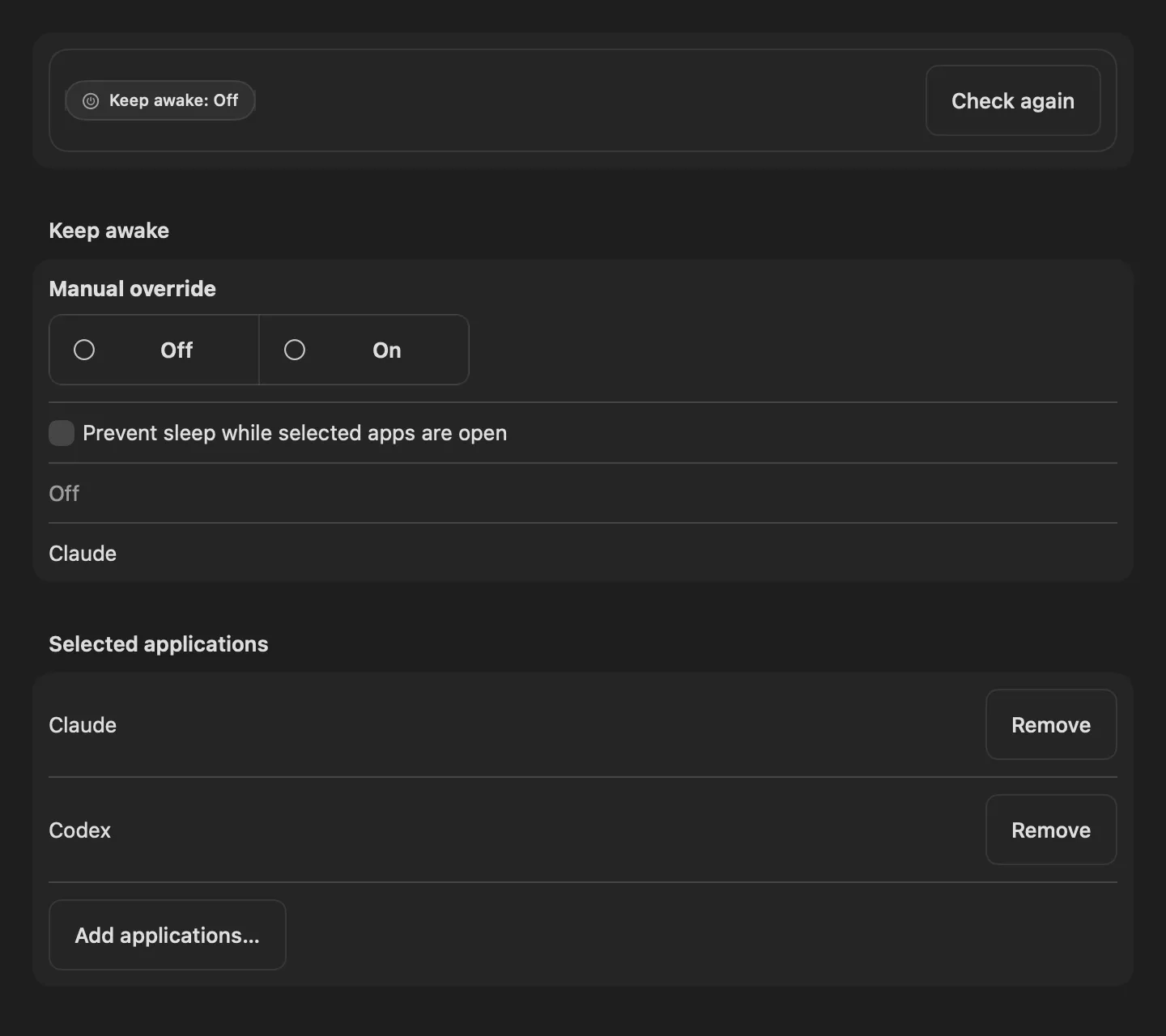
Keep Awake prevents sleep while selected apps are open, including lid-close sleep. Claude and Codex are the starting selections; add your own apps or use the manual On and Off controls. Codex purchase credits appear separately from allowance and banked resets. Optional local AI access can read reports and perform the account or settings actions you permit.
How each AI tool connects
Keep the accounts together. Read each figure in context.
TibTib AI Usage Watch uses the readings available for each AI tool. Each bar shows allowance left, but the units and usage period can differ between tools.
01 / CLAUDE
Weekly allowance and five-hour details.
Import a usage JSON file or save a manual reading from your Claude dashboard. Weekly allowance and five-hour details appear when your reading includes them.
Import a usage file or save a manual reading from your Cursor dashboard to see included usage and available reset time. The app doesn't assume a weekly period.
TibTib AI Usage Watch reads weekly credit usage from Grok logs you select. Run Grok to update them. The menu labels old logs and expired windows as historical.
Check the reading before relying on it. AI tool limits and data can change. Saved readings may be old, and other restrictions can affect your next request. TibTib AI Usage Watch keeps available figures visible without increasing your allowance.
Make it yours
Set up the accounts you use for work.
01 / CONNECT
Add your readings.
Import a usage file, select local logs, save a manual reading, or use an OpenCode or Windsurf / Devin usage key. Core allowance monitoring needs no account with us. Our reset-post feed requires a verified account; reset-announcement email is a separate opt-in.
02 / RECOGNISE
Make each account easy to recognise.
Press ⌘, to open Preferences and change labels, colors and letters. You can display multiple Claude and Codex accounts together.
03 / KEEP WORKING
Click when you need more detail.
The bars give you a quick allowance view. Click for available reset times and reading status. Preferences lets you set the refresh interval and choose whether the app opens at login.
Find the fit for your workflow
Choose an allowance view or more detailed reports.
Our guide explains what each monitor shows and how it connects, so you can choose around the information you need.
We make TibTib AI Usage Watch and wrote these comparisons using official feature sources. We don't assign ratings.
TibTib AI Usage Watch is a free native AI usage monitor for Mac. It displays available allowance information for configured Claude, Codex, Cursor and Grok accounts in the menu bar. It requires macOS 14 or later on Apple silicon and is free on the Mac App Store.
Do the bars show usage spent or allowance left?
The filled bar shows allowance left. It gets shorter as you use the account, with no filled bar at 0%. Color identifies the account. Click the menu bar icon for percentages and available reset times.
Can it warn me before a banked reset expires?
Yes, when your imported Codex usage file includes banked reset expiry information. Enable Warn before reset in Preferences and choose 1–14 days ahead; the default is two days. Click for counts and expiry dates. Warnings require the app running and current readings. The app doesn't use banked resets automatically.
Can I monitor more than one Claude or Codex account?
Yes. Add each account with its own usage file, selected logs or manual reading, then give it a label, color and letter.
Does every AI tool use the same weekly allowance?
No. Claude and Codex readings can show weekly allowance, with five-hour details for Claude when your reading includes them. Cursor uses its own included-usage figure without assuming a weekly period. Grok reads weekly credits from the logs you select. Matching percentages don't mean matching numbers of prompts, tokens or dollars.
What happens when a usage reading fails?
The last good reading stays visible and returns after relaunch. The menu explains the error and gives the saved reading's age. Cached and historical figures can be old. Select Refresh now to request an update and bypass error backoff.
Does the app send requests or only read usage?
It reads usage files, logs and manual readings you choose. With an OpenCode or Windsurf / Devin key you save, it reads usage from that service's API. This Mac App Store edition sends no prompts and doesn't start idle usage windows.
Is TibTib AI Usage Watch free?
Yes. The app needs no account or subscription with us. Claude, Codex, Cursor, Grok and the other AI tools are separate products with their own account requirements, limits and charges.
Is this a token-cost dashboard or an official app from an AI company?
No. TibTib AI Usage Watch is an independent Guiix utility for remaining allowance, reset information and local token-cost estimates. Estimates use recorded tokens and model prices, not a bill from any AI tool, and it does not increase limits. Compare the different types of monitor if you need history, cost reports or wider AI tool coverage.
A free app for your Mac menu bar
Keep account allowance close to your work.
TibTib AI Usage Watch is a free native Mac app. It's on the Mac App Store. Claude, Codex, Cursor, Grok and the other AI tools it reads are separate products with their own plans and charges.
 TibTib AI Usage Watch